by Rich Cini
Updated 05-Aug-2026 08:22 -0400
This is a follow-on discussion related to the Microsoft Open Source Blog Post "Continuing the story of early DOS development."
For many years (1997), I've been involved in the retrocomputing hobby, recovering and rescuing machines from various places, doing restoration work, and generally working with machines that existed before I got involved in computing. I began with computers in the early 1980's, so I largely missed the breakout S-100 platform and was definitely way too young to have experienced minicomputers such as the PDP-10. Instead, I started off with the Commodore VIC-20 which I received for my birthday. Mostly into the early 1990's, I was a "computer user" and occasional programmer, and had yet to develop the "preserve and protect" gene (or maybe better said, that gene didn't express itself until the late-1990's).
With the advent of Windows 3, I really started getting interested in how software worked from the inside, especially Windows, and I devoured nearly everything written by the major "internals" authors of the day -- Andrew Schulman, Dave Maxey, Murray Sargent, Matt Pietrek, Al Williams, Geoff Chappell, Mike Podanofsky, and Ray Duncan. I still have these books on my shelf and refer to them often. With Commodore's bankruptcy in 1994, I started working on a preservation project for the VIC kernel ROM, about which I wrote several articles for the old C=Hacking magazine.
Also in 1994, I joined an "elite" external, sanctioned, bug hunting group on CompuServe (I still remember my user number!) by the name of "ClubWIN" for the Win95 beta (Build 331 is when I joined). Having that beta experience, and the subsequent visit to Redmond, drove me to start working backwards through Microsoft's history to the beginning, and to the original Q-DOS created by Tim Paterson.
It wasn't long after Windows 95 launch that I stumbled upon the Altair Emulator by Claus Giloi (who worked at Microsoft). It worked, but there was an opportunity to expand it to make it truly useful as an emulation platform. I contacted Claus and got permission to continue development and, using SIMH as a model, I added a lot of functionality over the ensuing years, renaming it the Altair32 Emulator.
Around the same time, I was introduced to the ClassicCmp mailing list, and then my "old computers" gene flipped, and I started studying old machines and collecting several of them. Nothing museum-worthy, but fun to learn about and use. I have collected everything from single-board computers (the KIM-1) to the PDP-11 (an 11/34a rescued from the University of Pennsylvania), several S-100 boxes (an IMSAI, an Altair, and a Gazelle to name a few) up to a relatively modern Sparc IPX -- all told, maybe 75 different machines spanning 20 years of computing history and platforms.
For the last 25+ years, I've worked on various "vintage" projects, mostly S-100 related, building and rebuilding systems, working with emulations, and writing my own, in addition to designing single-board computers and peripherals and doing board recreations. I've written articles on implementing CP/M systems, and presented at the Vintage Computer Festival. But, it's now 40+ years since some of these systems were introduced and bits begin to rot -- EPROMs fail, diskettes flake, and people forget how to maintain and use these systems. So, my focus now is working to preserve and document these systems for the future.
I joined the "DOS Disassembly Group" in 2024 to lend a hand in decoding early Seattle Computer Products software that was released by f15sim as part of a trove of disks he received. I had already built myself a Seattle Gazelle in a configuration that would have been period-correct for developing Q-DOS (although I think Tim actually used a Cromemco Z system for initial development, and then translated it to 8086), and that was very helpful. I also own an original IBM PC 5150, so we could reconstruct certain interactions between DOS and the PC.
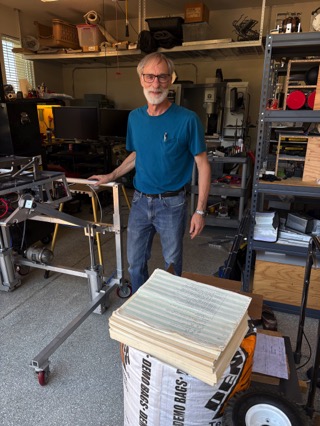
As we started working, the project became for me more of a "digital archeology" project than anything I worked on before. Discipline and attention to detail are a must. A real watershed moment was when I was able to obtain original source printouts from Tim Paterson. I had corresponded with Tim a few times over the years, but knowing these existed gave me reason to email him again :-). Fortunately, a close friend of mine, Frank Ancona, lived near enough to Tim to pick them up and send them to me.
{Image of Tim in his workshop with the stack of printouts. Courtesy of Frank Ancona}
The blog page by @BrokenPipe here goes into a lot of detail about the overall process of handling these, and what we learned form working with the printouts and disks from f15sim. 45-year-old printouts are very hard to work with and there aren't many scanners capable of scanning wide-carriage printouts. But as I worked with the printouts, I couldn't help but think about what was going on at the time between Tukwila, WA (where SCP was located) and Bellevue, WA (where Microsoft was located) -- two small companies in a new field of computing working (either directly or indirectly) with an industry behemoth driving towards a hard deadline for a product introduction that would change the world.
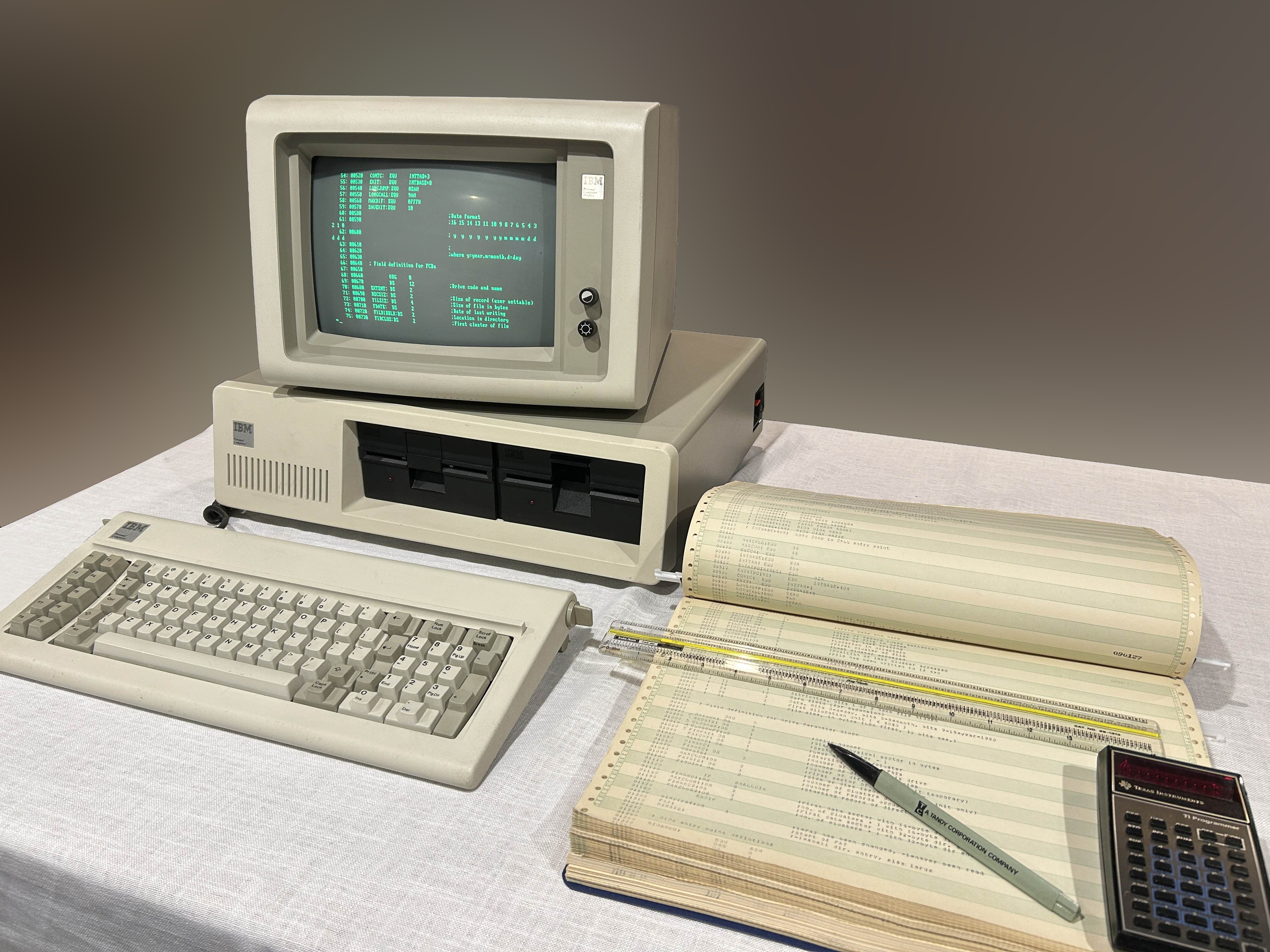
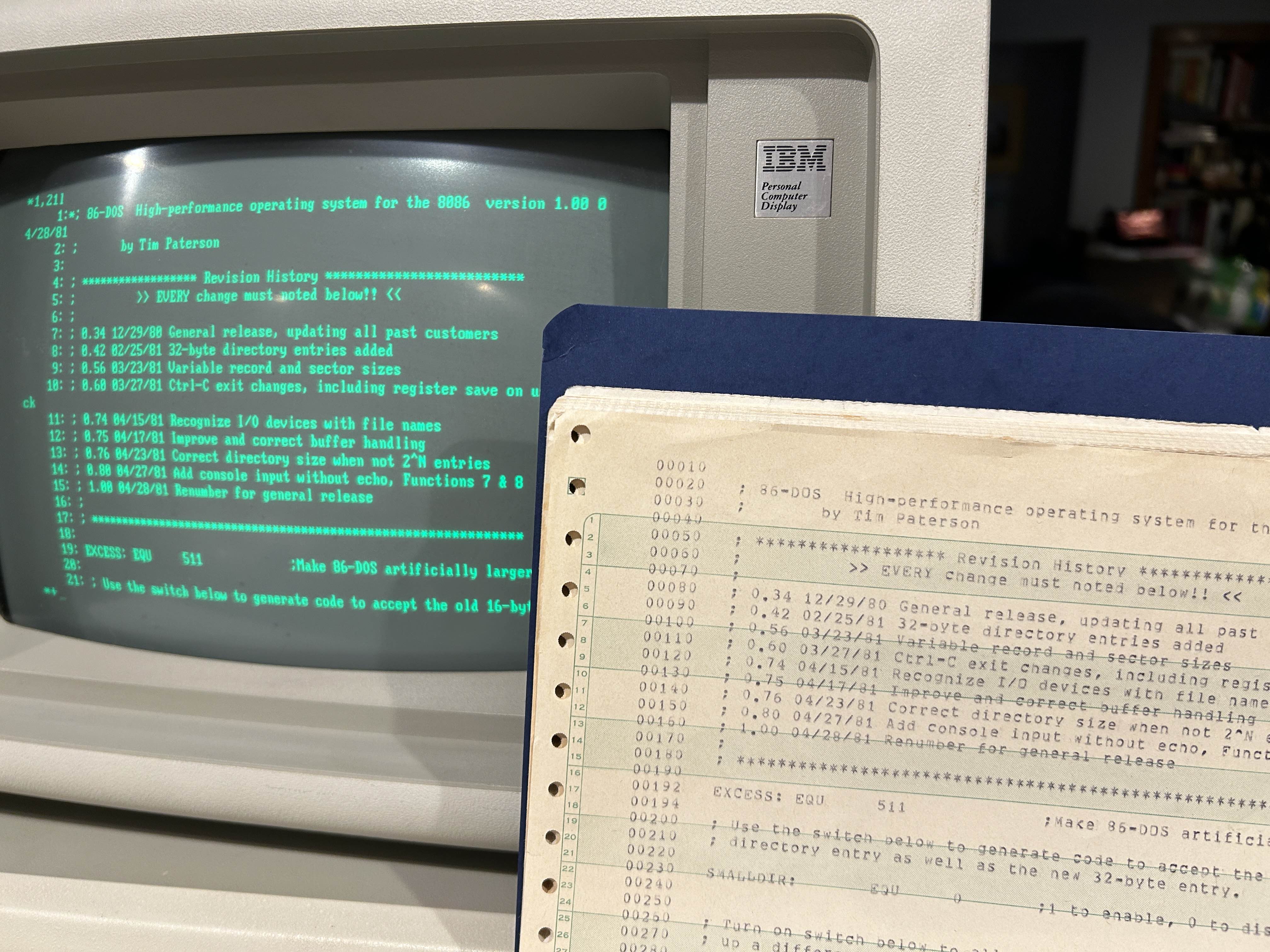
{Images of my original IBM-PC with a stack of printouts received from Tim}
The most interesting part of the project though was debating code changes, the reasoning behind the changes, finding anomalies in the printouts or sources -- working backwards from known code to unknown code. Many of the printouts were original PDP-10 line printer listings, so I went about reconstructing through emulation a reasonable facsimile of what Microsoft's system might have looked like so we could test-recreate the printouts. We also delved into what a development workflow might have been based on writings from Bob O'Rear and, as described on my HAL-related pages here and on GitHub regarding transferring files between Microsoft and IBM. We also theorized about other "internal" things like development environment, system configurations, and the like. @BrokenPipe developed a utility and process to get the recreated source files into the TOPS-10 environment for editing by SOS, the TOPS-10 line editor. What's missing is the TOPS-10 cross-assembler for 8086 code called XMACRO-86. Having that would be a great help in creating the full end-to-end tool chain (minus the Intel ISIS-II which was used for part of it).
During the process of scanning and converting documents, we discovered several things, but most importantly that current OCR tools are really not suited for this kind of work. Tim's printouts are now 45 years old, printed with multiple printer types: a formed-character printer like the DEC LA20 line printer, a dot-matrix printer like the DECWriter (maybe an LA36, LS120, or DECWriter IV), or a typewriter-style printer using a daisywheel printer (model unknown, but something like a Dataproducts 5582). The paper has yellowed and the print has faded. The dot-matrix and daisywheel prints were of better quality and fared better through the OCR conversion.
The printers used by Tim, SCP, or Microsoft is largely an educated guess. However, there are pictures on this archive.org snap of Microsoft's offices in November 1979 (just after they moved from Albuquerque, NM to the Northrop building) which provide some possible clues.
With less-than-satisfactory OCR output, I resorted to a process I used many years ago when converting scans made of old Commodore ROM dumps printed on a Commodore 1515 dot-matrix printer. The process relies on the ASCII OCR output having the same repetitive errors. "B" and "8", "S" and "5" are good examples, as are "l" and "1", and "O" and "0". There are many other similar single-character errors and, when working with x86 code, there are similar errors with instructions like "MOV". This process naturally works better if the output file is monolithic rather than single-page OCR conversions because you can do substitutions across the entire converted printout and not 75 separate files.
The next formatting hassle was the spacing. This required repetitive substitutions of a descending numbers of spaces to tabs (i.e., replace 8 spaces with a tab, 7, 6, etc.). Then if you want to return it to fixed spaces (which is likely how the original printer printed it -- spaces and not vertical tabs), you can. For pure re-creation work, spaces produce absolute column formatting while tabs can move around depending on the program displaying the file.
Once you run thought the 15 or so common global substitutions and tab conversion, it's a lot easier to work with the file to fix formatting and perform other cleanup. This is then followed by a line-by-line comparison against the original printouts. Overall I'd say the conversion output quality with this method is very good.
There is an on-line fee-based service that converts dot-matrix printed receipts to text which seems to work well on a test basis, but, with no budget, we relied on the substitution method for our work.
Once there was a workable source code text file, I attempted to print it using native tools. Not having a PDP-10 handy (really a DECSYSTEM-2020 in the "corporate" cabinet running TOPS-10; no space in the shop...I'd really love one though), I resorted to a SIMH configuration running TOPS-10 (specifically, the Steuben TOPS-10 setup). Not to take too much of a tangent, but TOPS-10 is a multi-user timesharing system and each account is given a PPN (project programmer number) and name which functions as a login. If a user wants to print something, they submit the print job to the print spooler, which is then released from the spooler queue to the line printer by the system operator. The TOPS-10 print spooler, if so configured, will print a banner page that acts as a separator between print jobs. The banner identifies the file that was printed and by whom.
For our purposes, these revealed a lot of information:
*START* User BASLIB-86 [20,67]. Job 86DOS Seq. 2408
Date 08-Jul-81 13:49:36 Monitor Microsoft 1091 603a4d80j *START*
File: DSKC:86DOS.A86<055>[500,500] Created: 07-Jul-81 17:06:59 Printed:
08-Jul-81 13:49:52
QUEUE Switches: /FILE:ASCII /COPIES:1 /SPACING:1 /LIMIT:129 /FORMS:NORMAL
With a little help from @bitsavers and some knowledge about how TOPS-10 is configured when installed, we theorized it's a custom-configured "monitor" (think system kernel) running TOPS-10 v.6.03. "1091" is either the serial number or type of CPU (KI10, i.e., KI1091S). It also reveals the original file name, the user that ran it when it was printed ("BASLIB-86"), and that the file itself resided in the disk space of PPN [500,500] (which is the user "ROS BASIC", inferred to mean "IBM ROM BASIC" as IBM commonly used the term "ROS" to mean ROM). The reader will also note the file permission code "<055>". This works like Unix and derivatives where the octal digits represent owner-group (project)-other. The higher the number, the more restrictive the access permission. Zero means full access (change protection, rename, write, update, append, read, execute), while "5" means "read, execute" -- an access level that is common for shared files.
The queue switches control aspects of the printer output ("NORMAL" means 14.875" x 11" wide paper; "NARROW" would be US Letter). The Steuben pre-built configuration uses v7.04 but I didn't feel the need to create my own 6.03 version for this work.
The various PPNs we encountered potentially reveal Microsoft's attempt at code management by creating "users" to represent products. To my knowledge, no source code management system was available for TOPS-10. Both Unix and Xenix could run on the PDP-11, and the first x86 version of Xenix was released around 1982. Some light searching indicated a Source Code Control System (SCCS) was available for Xenix 286 which would place the date around 1984. User accounts:
ROS BASIC [500,500]BASLIB-86 [20,67]MS-DOS [500,100]MULTI-PLAN [104,103]So, I used SIMH to simulate this process, but getting our files into the TOPS-10 environment required some fancy footwork using multiple terminal sessions and the Kermit file transfer program, a good description of which is here. This guide is a great top-level summary of system management. This is a common process for PDP-10 simulations, and SIMH is a great platform for this (and a lot smaller, too!).
In the end, we were able to recreate a tool chain and produce binary-identical object files, which is a home run as they say.
For me, being able to converse with someone who was there at the beginning of the PC revolution is an amazing thing. What I find interesting is the relative modesty that some of these people display. To them, it was a job, a project, or a hobby (which may have turned into a job...). No doubt, there are bookshelves and copy boxes filled with printouts and diskettes still held by many of these early pioneers that's worthy of saving before they suffer from permanent bit rot and are lost forever.
/RAC
My codespace on GitHub.
Paterson listings on GitHub.